
What does a cake actually cost you? Costing by the gram and pricing by the slice
Short answer: tell a recipe what the batch actually makes — 4,000 g of batter, or 40 cookies — and Bake Boost gives you a cost per gram and a cost per piece. Then cost a cake by the amount it really uses (950 g, 7 cookies) instead of inventing a fraction, and price it the way you quote it: per kilo, per serving or per dozen. It is called Costing & Pricing Engine 2.0, it is on every plan, and it changes nothing until you use it.
This is post five in the series on what Bake Boost does for you day to day. Post four was about low-stock alerts — knowing before you run out of flour. This one is about the question underneath every price you have ever quoted: what did that cake cost to make?
The quick facts
| What it does | Costs recipes by weight or pieces, and prices products per kilo, serving or dozen |
| Where you find it | The Yield control on a recipe · the Price basis control on a product · Moulds in the sidebar · Settings → Business → Pricing |
| What it replaces | Nothing. Servings costing and flat markup stay the default |
| The costing unit | Cost per gram, cost per piece, or cost per serving — your choice, per recipe |
| The pricing bases | Flat markup (default) · per serving · per weight · per unit / dozen |
| Complexity tiers | Simple ×1.0 · Detailed ×1.5 · Intricate ×2.0 · Showpiece ×3.0 — or your own |
| Plan | Every plan — Essentials, Growth and Pro |
Why "servings" is the wrong unit for a kitchen
Ask a baker what a cake cost and you will get a shrug and a guess. Not because bakers are bad at maths, but because the number is genuinely hard to get at — and most software asks for it in a unit nobody bakes in.
Here is the problem with servings. You mix one batch of vanilla batter. It costs you $45 and it fills a 9-inch round, a 7-inch round and two loaf tins, with some left over. How many servings was that batch? The question does not have an answer. The batch does not make servings. It makes 4,000 grams of batter, and the servings only appear later, when you decide what to bake and how to cut it.
So bakers do what the software forces them to do: they guess a serving count for the recipe, then fudge a quantity on the product. If a 9-inch cake takes a bit under an eighth of the batch, you end up typing 0.1125 into a quantity box — a number you worked out on your phone, which nobody will ever be able to check, and which is wrong the moment you change tin sizes.
That is the thing Engine 2.0 removes.
How do you cost a recipe by weight?
Open any recipe and look at the top. There is a Yield control with three choices.
| Yield type | What you enter | What you get back |
|---|---|---|
| Servings (the default) | A number of servings | Cost per serving — exactly as before |
| Weight (g / kg) | What the batch makes, e.g. 4000 g | Cost per gram |
| Units / pieces | The batch count, e.g. 40, plus a name like cookie | Cost per piece |
Set a vanilla mix to Weight with a yield of 4,000 g, and the recipe that costs $45 in ingredients now tells you something genuinely useful:
$45 ÷ 4,000 g = $0.01125 per gram.
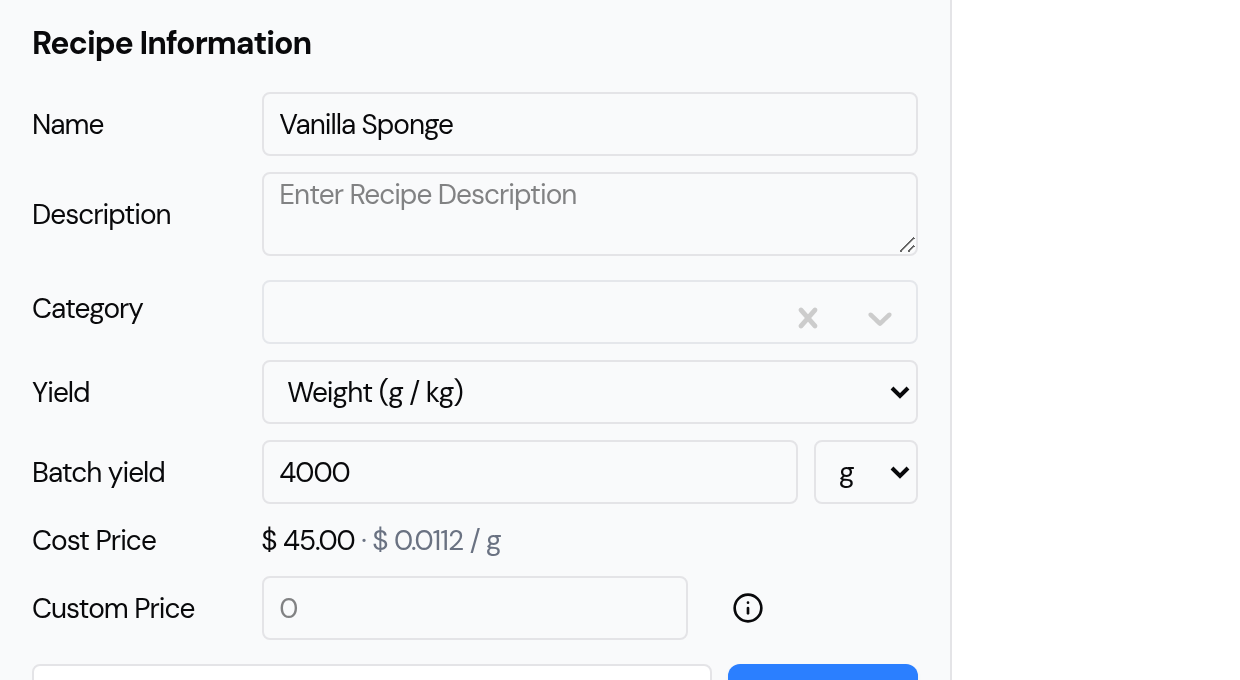
That single number costs any cake made from that mix, at any size, forever. It also appears as a Cost / unit column on the recipe list, so you can scan your whole library and see which mixes are expensive per gram and which are cheap.
A recipe you leave on Servings behaves exactly as it always has. Nothing moves.
How do you cost a cake by the amount it uses?
This is where the fraction goes away.
Build a product from a weight-yield recipe (Products → a Recipe product → the Recipes section) and the line no longer asks for a multiplier. It asks for an amount used, in the recipe's own unit. Type the grams the cake actually takes and Bake Boost does the arithmetic:
450 gof that 4,000 g / $45 batch → $5.06950 g→ $10.697cookies from a 40-piece / $44.50 batch → $7.79
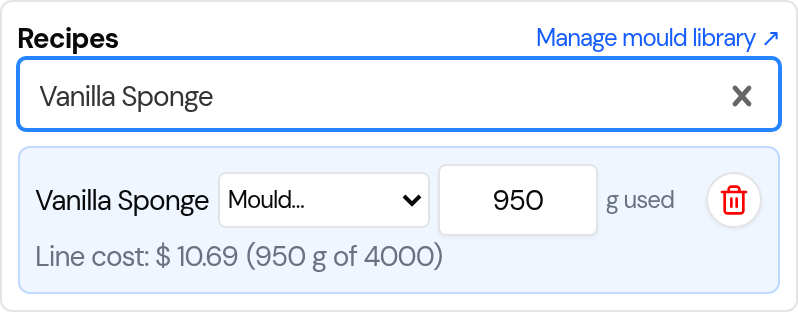
One deliberate behaviour worth knowing: until you enter an amount, a weight or piece line contributes no cost and says "Enter amount used to cost this line." An empty box means "nothing used yet" — not "a whole batch". A blank that quietly costed the full $45 would be a much worse bug than an obvious gap.
Do I have to re-type my tin sizes every time?
No — and this is the part that saves the most typing over a year.
You use the same pans every week. Save them once in Moulds (sidebar, under Products & Inventory), each with the grams it holds: 9" round = 950 g, 7" round = 700 g, loaf tin = 800 g. Then on any weight-recipe line, pick the mould from a dropdown and the amount fills itself in. You can still edit it.
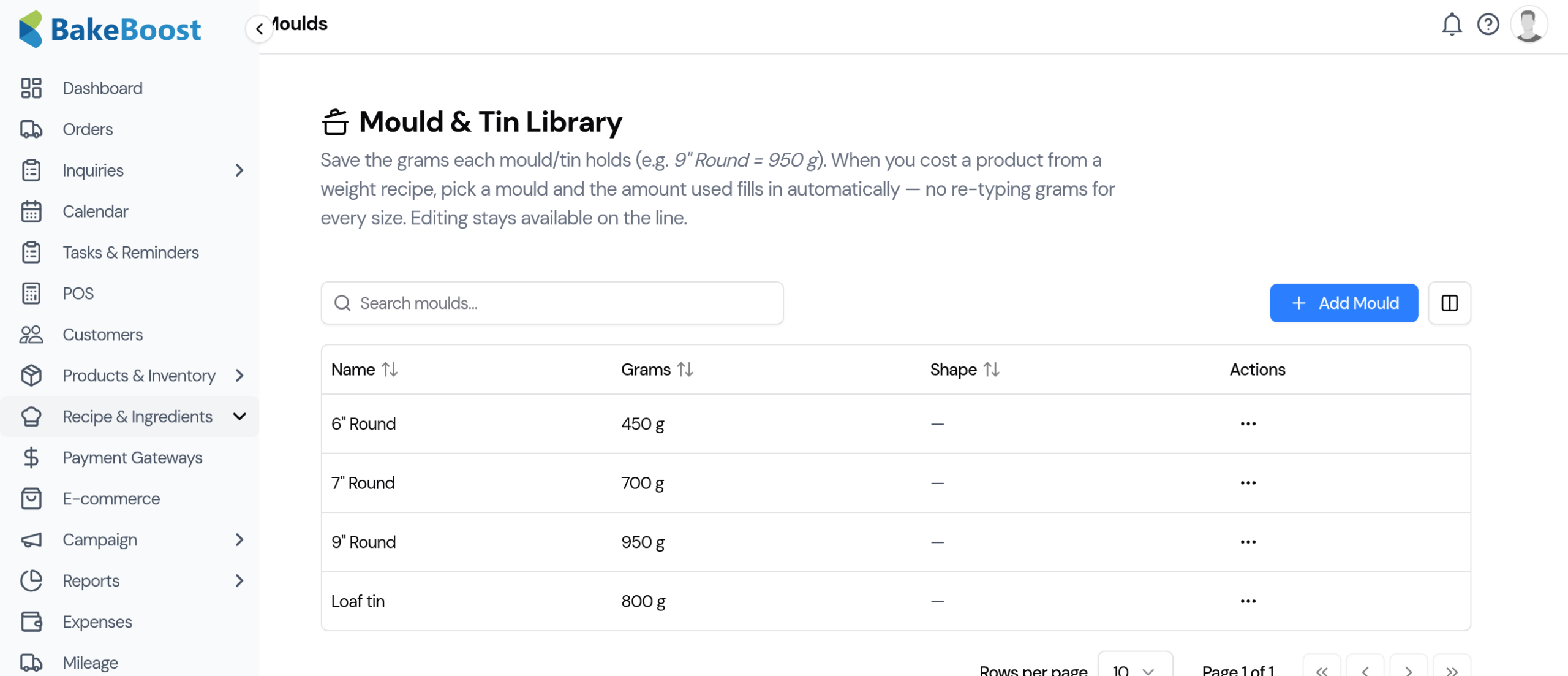
A mould is always stored as a weight in grams, and the grams convert into whatever unit the recipe uses — so a 950 g mould on a recipe measured in kilos fills in as 0.95, not 950.
Can a recipe be built from other recipes?
Yes, and if you make a base sponge or a Swiss buttercream in bulk, this is the feature to reach for first.
Open a recipe, find Sub-recipes below the ingredients, pick another recipe and enter the amount used. 450 g of a 2,000 g buttercream batch that cost $12 rolls in as $2.70.
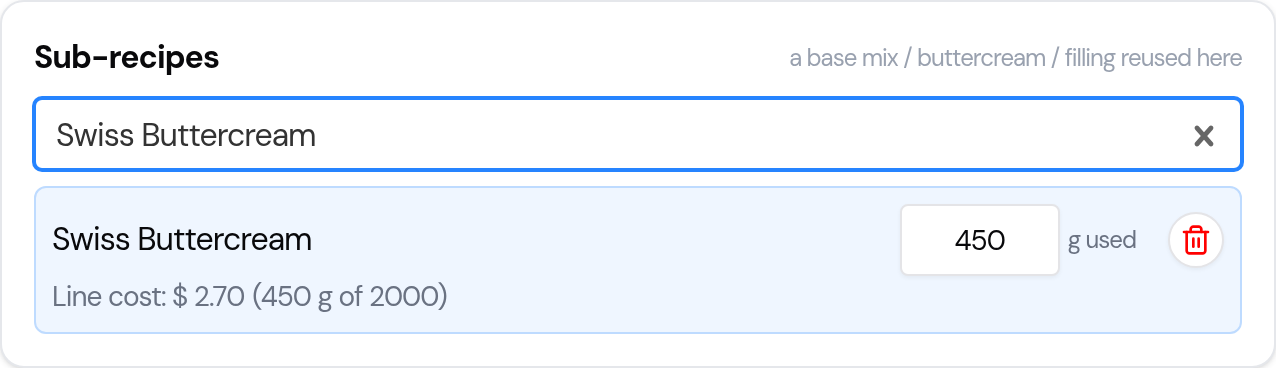
A finished cake's cost then reads its own ingredients + its base mix + its filling + its frosting, each by the amount it genuinely uses, with none of that data entered twice.
Two honest caveats. A sub-recipe's cost is a snapshot taken when you add it — change the base recipe's ingredients later and you need to re-add the sub-recipe to pick up the new cost. And a recipe cannot contain itself; circular references are blocked rather than allowed to spin.
How do you price per kilo, per serving or per dozen?
Costing tells you what you spent. It does not tell you what to charge — and bakers around the world charge in three completely different units.
Per kilo is the international norm. Per serving is how US wedding and custom cakes are quoted. Per dozen is cookies and cupcakes. Until Engine 2.0, Bake Boost only offered a flat markup on cost, which fits none of them.
Now a product has a Price basis:
| Basis | You enter | The price becomes |
|---|---|---|
| Flat markup (default) | A markup on cost | Cost + markup — exactly as before |
| Per serving | Rate × servings × complexity | $8 × 100 servings = $800 |
| Per weight | Rate × weight | $30/kg × 2.5 kg = $75 |
| Per unit / dozen | Rate × quantity | $18/dozen × 3 = $54 |
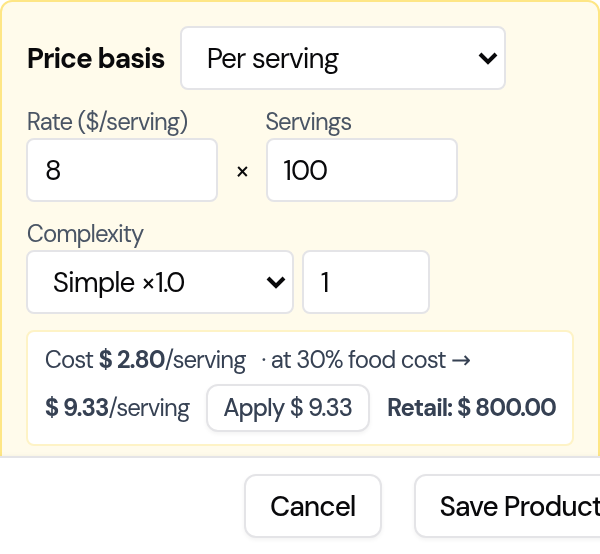
There is one design decision in here that matters more than it looks. When a basis is active it sets the sell price directly — rate × quantity — and it is independent of cost. Re-cost the cake next month because butter went up and the quoted price does not silently move underneath a customer. Your cost changes; your quote does not, until you change it. Discounts and tax still apply on top exactly as they always did.
Will it tell me what rate to charge?
It will show you the rate your own target margin needs, and let you take it with one click.
Enter a basis and a quantity, and Bake Boost puts your cost per unit next to the rate that would hit your margin:
Cost $2.80/serving · at 70% margin → $9.33/serving [ Apply ]
Apply drops that rate straight in. The default target is a 70% margin — a 30% food cost, the number most cake businesses are told to aim at — and you can change it in settings.
That is the whole argument for costing by the gram, in one line. You cannot know whether $8 a serving is a good price until you know the cake costs you $2.80 a serving. Guess the cost and you are guessing the margin.
The method behind that number — what belongs in the cost, margin versus markup, and how to find the right rate for your market — is set out in full in how much should you charge for a cake. To price per serving you also need a serving count you can defend: the cake serving size chart has every size and portion.
What about intricate work?
Two cakes can take the same batter and nothing like the same hours. In Per serving mode there is a Complexity picker that multiplies the rate:
Simple ×1.0 · Detailed ×1.5 · Intricate ×2.0 · Showpiece ×3.0
So $8/serving × 100 servings × Intricate (×2.0) = $1,600. Or type your own multiplier for a one-off.
Better still, replace the tiers with words you actually use with customers. Settings → Business → Pricing lets you rename, re-value, add or remove them — Standard ×1.0, Wedding ×2.5, whatever matches your book — and your tiers then appear everywhere per-serving pricing does. There is a Reset to defaults if you change your mind.
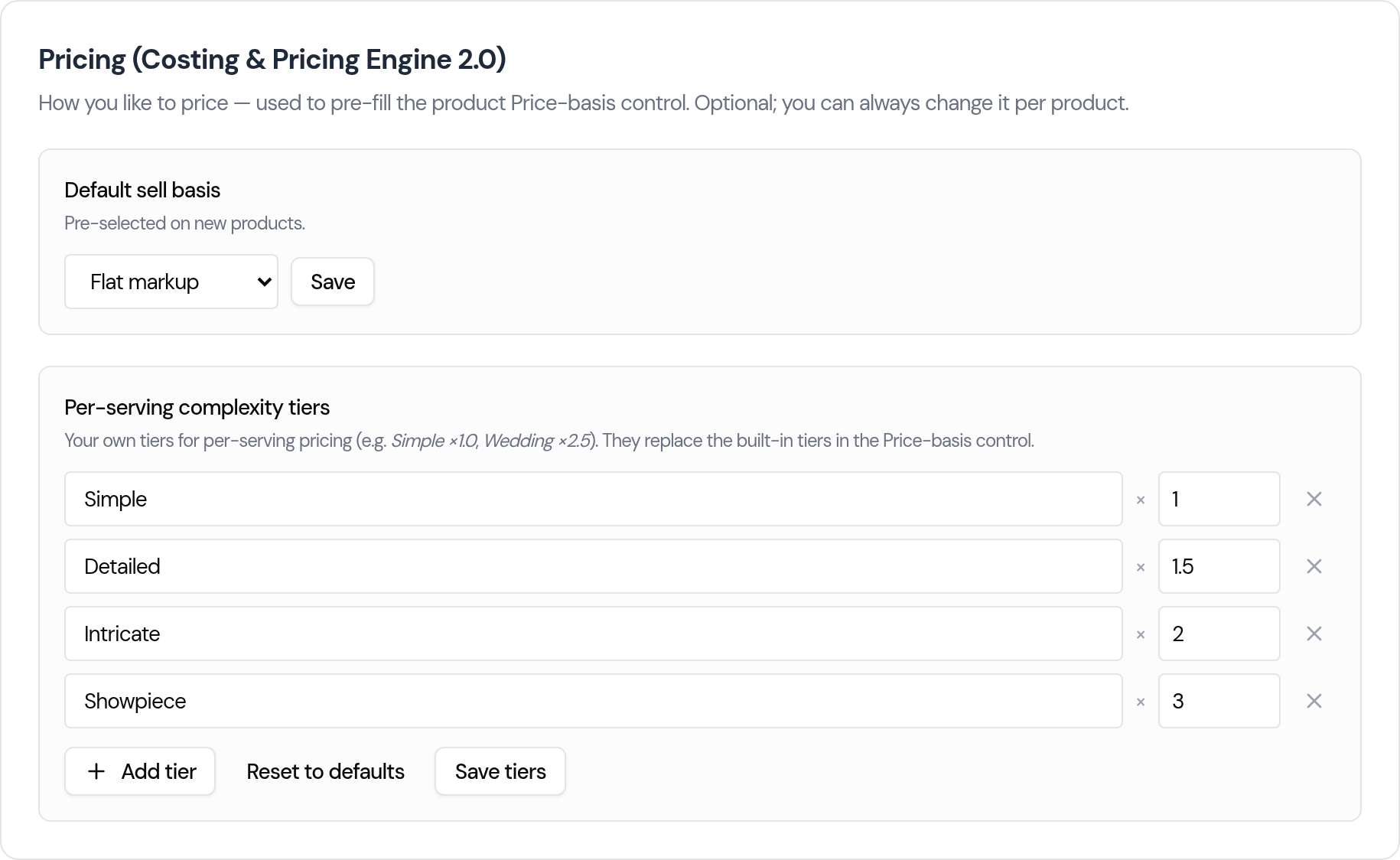
The same settings page holds your default sell basis, which pre-selects a basis on every new product. That is a convenience only — nothing is priced by a basis until you type a rate, so a half-finished product stays on flat markup rather than jumping to $0.
Does it work on boxes and bundles?
Yes. A Composite product — a dessert box, a grazing box, a mixed dozen — can take a price basis too, so you can price the box the way you sell it ("serves 8 → $9 a serving → $72") while its components still add up your cost underneath.
And on the order screen itself, the quick-add items (Cake, Cookie, Cupcake, Cake Pop, Other) have a "Price by serving / weight / unit" helper that works out a line total the same way and drops it onto the item. Cakes take the whole-line total; the per-item forms set a unit price and a quantity, so an order line can never double-count.
What stays exactly the same?
This matters, because a costing change that moves old numbers is a costing change you cannot trust.
- A product you never touch keeps flat markup, unchanged.
- A recipe left on Servings costs exactly as it did.
- Storefront, POS, invoices, receipts, COGS and the financial reports all read the same price fields as before. A price basis only changes how the sell price is worked out in the form.
- Discounts and taxes behave identically.
Engine 2.0 is additive, per recipe and per product. There is no migration to run and no moment where your catalogue re-prices itself.
Who can use it, and what does it cost?
Costing & Pricing Engine 2.0 is on every Bake Boost plan — Essentials, Growth and Pro — at no extra cost and with no credits involved.
If you want a second opinion on the rate itself, the Pro AI Pricing Advisor reads your real costs and suggests a price with its reasoning. The full plan breakdown is on the plans page, and the step-by-step guides are in the docs: costing by weight and pieces and pricing by weight, serving and dozen.
Where to start, if you only have ten minutes
- Pick your one busiest mix — the vanilla, the chocolate, the buttercream.
- Set its Yield to the grams the batch makes. Read the cost per gram.
- Save your three most-used tins in Moulds with their grams.
- Open your best-selling cake, pick the mould, and look at what the line actually costs you.
- Compare that to what you charge.
Most bakers find step 5 uncomfortable. That is the point of it.
Frequently asked questions
Do I have to change how I cost everything?
No. Costing & Pricing Engine 2.0 is additive and works per recipe and per product. Recipes stay on servings and products stay on flat markup until you choose otherwise, and your existing numbers do not move.
How does Bake Boost work out a cost per gram?
You tell a recipe what the batch yields — for example 4,000 g — and it divides the recipe's ingredient cost by that yield. A $45 batch yielding 4,000 g is $0.01125 per gram, which then costs any cake made from that mix at any size.
Can I cost a cake by the grams of batter in the tin?
Yes. On a weight-yield recipe line a product asks for the amount used rather than a multiplier, so you type 950 for a 9-inch tin and Bake Boost returns the line cost — $10.69 from a 4,000 g, $45 batch.
What is a mould in Bake Boost?
A saved tin or pan with the grams it holds, kept in the Moulds library. Pick it on a recipe line and the amount used fills in automatically. Grams convert into the recipe's own unit, so a 950 g mould on a kilo-based recipe fills in as 0.95.
Can I price a cake per kilo instead of per serving?
Yes. A product's price basis can be flat markup, per serving, per weight or per unit and dozen. Per weight multiplies your rate by the weight — $30 per kg on a 2.5 kg cake is $75 — and the result sets the sell price directly.
Will re-costing a product change a price I already quoted?
No. When a price basis is active the sell price is rate times quantity and is independent of cost, so a cost increase never silently moves the quoted price. You change the rate when you decide to.
What are complexity tiers for?
They multiply a per-serving rate to account for the work a cake takes rather than the batter it uses. The built-in tiers are Simple ×1.0, Detailed ×1.5, Intricate ×2.0 and Showpiece ×3.0, and you can replace them with your own names and multipliers in settings.
Which Bake Boost plan includes costing by weight and price bases?
All of them. Essentials, Growth and Pro each include recipe yields, amount-used costing, moulds, sub-recipes and every price basis at no extra cost.
Next in this series
Next we look at the waste nobody budgets for — trimmings, failed bakes and the stock that went out of date — and what it is really taking off your margin. If you want the whole picture now, see what you get with Bake Boost or why it is built for bakers.