
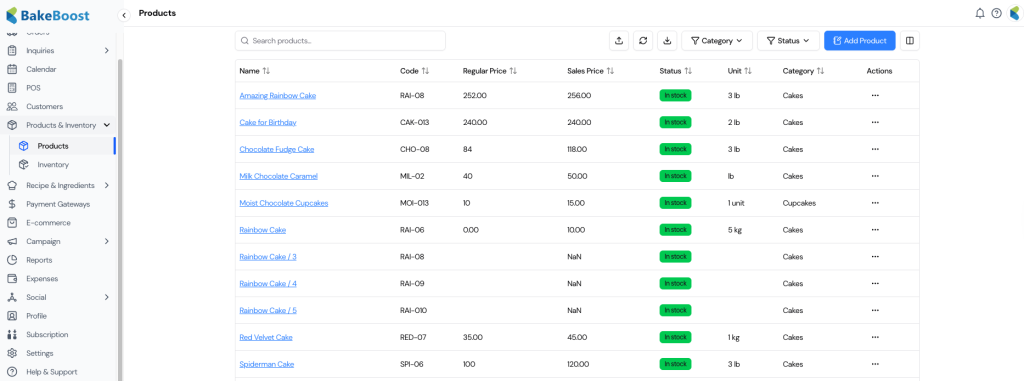
- 🛍️ Products
- 🧩 Product Types in Bake Boost
- 📊 Product Type Comparison (Summary)
- 🧾 Product Overview Section
- ⚙️ Product Details Section
- 📝 Product Description Section
- 🧾 Order & Invoice Description
- ⚠️ Allergens Section
- 🥗 Dietary Labels Section
- 🔁 Variant Product Setup (Step-by-Step)
- 🍰 Recipe Product Setup (Step-by-Step)
- 📦 Composite Product Setup (Step-by-Step)
- 💡 Tip
🛍️ Products #
The Products module in Bake Boost allows bakeries to create, manage, price, and sell all items offered to customers — whether they are simple items, recipe-based products, variants, or bundled offerings.
This module is tightly integrated with Recipes, Ingredients, Supplies, Inventory, POS, and E-commerce, ensuring accurate costing, stock tracking, and pricing across your entire business.
Bake Boost supports four powerful product types, giving bakers flexibility to model real-world bakery operations correctly.
🧩 Product Types in Bake Boost #
Bake Boost allows creation of the following product types:
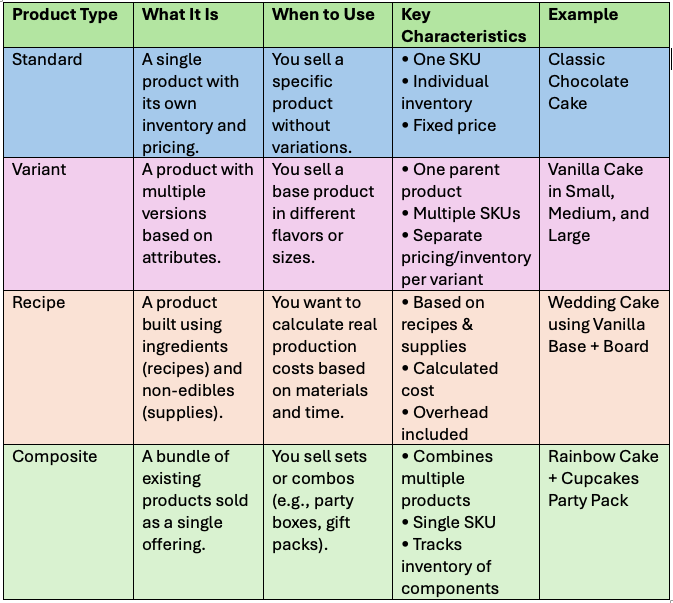
1️⃣ Standard Product #
A Standard Product is a single item with its own SKU, pricing, and inventory.
When to use:
- Selling a fixed item with no variations
- Independent inventory tracking
Key characteristics:
- One SKU
- Individual inventory
- Fixed price
Example:
Classic Chocolate Cake
2️⃣ Variant Product #
A Variant Product represents a group of similar products that differ by attributes such as size, flavor, or color.
Each variant has its own SKU, price, and inventory.
When to use:
- Same base product with multiple options
- Independent pricing and stock per variation
Key characteristics:
- One parent product
- Multiple SKUs
- Separate inventory per variant
Example:
Vanilla Cake – Small, Medium, Large
3️⃣ Recipe Product #
A Recipe Product is built using recipes (ingredients) and supplies (non-edible items).
This product type calculates the true cost of production based on real usage.
When to use:
- Costing based on ingredients and materials
- Including labor and overhead costs
Key characteristics:
- Uses recipes & supplies
- Automated cost calculation
- Overhead included
Example:
Wedding Cake using Vanilla Base + Cake Board
4️⃣ Composite Product #
A Composite Product is a bundled product made up of multiple existing products sold together as one SKU.
When to use:
- Party packs, combos, gift boxes
- Tracking inventory of bundled items
Key characteristics:
- Single SKU
- Consumes inventory of child products
- Transparent bundle costing
Example:
Rainbow Cake + Cupcakes Party Pack
📊 Product Type Comparison (Summary) #
| Product Type | Best For | Inventory | Pricing |
|---|---|---|---|
| Standard | Single item | Individual | Fixed |
| Variant | Size/flavor options | Per variant | Per variant |
| Recipe | Production-based items | Ingredients & supplies | Cost-driven |
| Composite | Bundles | Child products | Combined |
🧾 Product Overview Section #
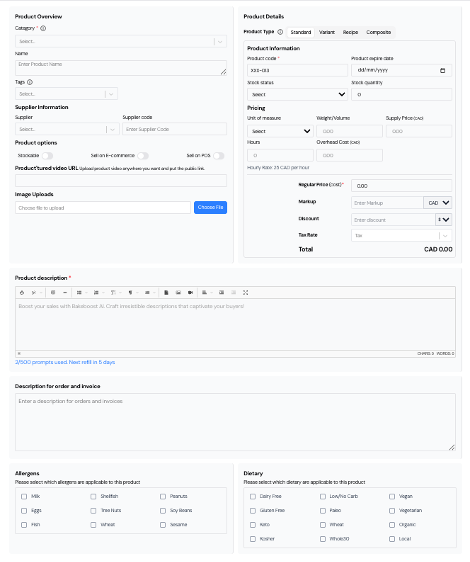
This section defines how the product appears and behaves across Bake Boost.
Fields include:
- Category: Organize products (Cakes, Cookies, Breads)
- Name: Product display name
- Tags: Searchable labels (e.g., Best Seller, Eggless)
- Supplier: Linked supplier (optional)
- Supplier Code: Internal supplier reference
- Stockable: Enable inventory tracking
- Sell on E-commerce: Show on online store
- Sell on POS: Enable in-store sales
- Product / Intro Video URL: External video link
- Image Uploads: Upload product images
⚙️ Product Details Section #
Defines inventory, pricing, and operational details.
Key fields:
- Product Type: Standard / Variant / Recipe / Composite
- Product Code (SKU): Unique identifier
- Expiry Date: Optional (perishable items)
- Stock Status: In stock / Out of stock
- Stock Quantity: Current inventory
- Unit of Measure: pcs, kg, dozen, lb
- Weight / Volume: Optional
- Supply Price: Cost to you
- Hours: Production time
- Overhead Cost: Labor, rent, utilities
- Regular Price: Base selling price
- Markup: Profit margin
- Discount: Optional
- Tax Rate: Applicable tax
- Total: Auto-calculated final price
📝 Product Description Section #
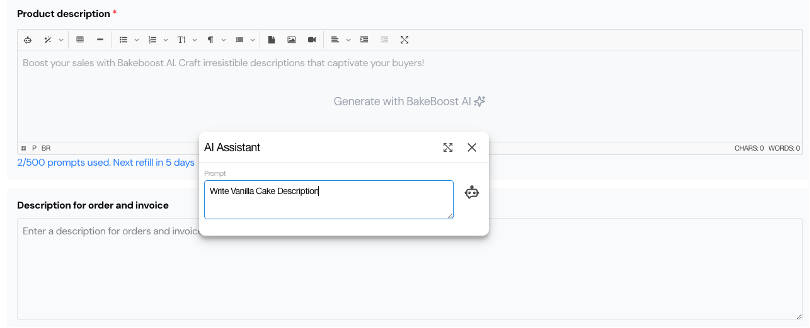
- Product Description: Rich-text description for store display
- Bake Boost AI Assistant: Generate SEO-friendly descriptions
- Word Limit Indicator: Tracks AI usage (500 prompts/month)
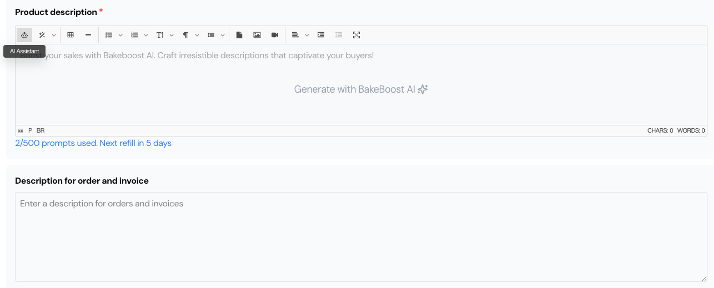
Use the Bake Boost AI Assistant for product description and writing that suits your brand and SEO friendliness.
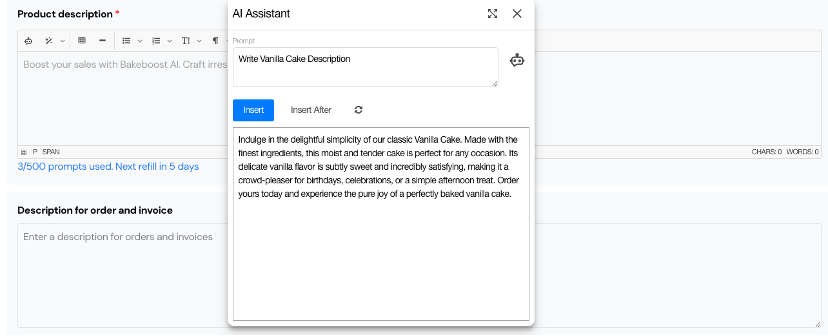
- Word Limit Indicator:
Shows prompts used out of the 500-prompt AI description assistant limit (resets every month).
Order & Invoice Description #
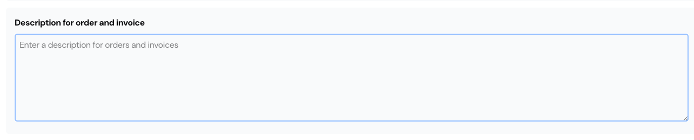
- Description for Order and Invoice:
Very Important: An internal note or product description that appears on invoices or packing slips, a Job sheet.
🧾 Order & Invoice Description #
- Description for Order & Invoice:
Internal text shown on invoices, packing slips, and job sheets
(Important for production clarity)
⚠️ Allergens Section #
Select all applicable allergens:
- Milk, Eggs, Fish, Shellfish
- Tree Nuts, Peanuts, Wheat
- Soybeans, Sesame
Helps with compliance and customer safety.
🥗 Dietary Labels Section #
Select applicable dietary tags:
- Vegan, Vegetarian, Gluten-Free
- Dairy-Free, Organic, Kosher
- Keto, Paleo, Whole30
- Low/No Carb, Local
Improves searchability and transparency.
🔁 Variant Product Setup (Step-by-Step) #
- Select Variant as Product Type
- Define attribute (e.g., Flavor, Size)
- Add values (Vanilla, Chocolate, Red Velvet)
- Configure each variant:
- SKU
- Regular Price
- Markup
- Discount
- Sales Price (auto-calculated)
- Add shared description and images
- Enable POS / E-commerce as needed
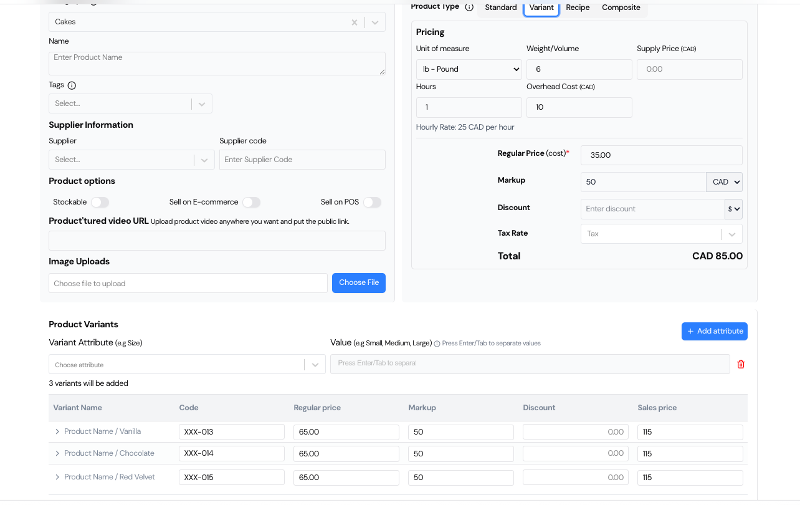
Add Details for Each Variant
Each variant appears in a list with editable fields:
– Code: Unique product code (SKU) for tracking
– Regular Price: Base price before markup or discount
– Markup: Profit margin added to the base price
– Discount: Optional amount or percentage off
– Sales Price: Auto-calculated based on price, markup, and discount
| Variant | Code | Regular Price | Markup | Discount | Sales Price |
| Product / Vanilla | XXX-013 | 35.00 | 50 | 0.00 | 85.00 |
| Product / Chocolate | XXX-014 | 50.00 | 50 | 0.00 | 100.00 |
| Product / Red Velvet | XXX-015 | 40.00 | 50 | 0.00 | 90.00 |
💡 The system calculates the final Sales Price using Regular Price + Markup – Discount.
Key Benefits of Using Variants #
– Easier product management for similar items
– Independent inventory tracking per variation
– Customer-friendly selection experience in your store
– More accurate profit calculations per product
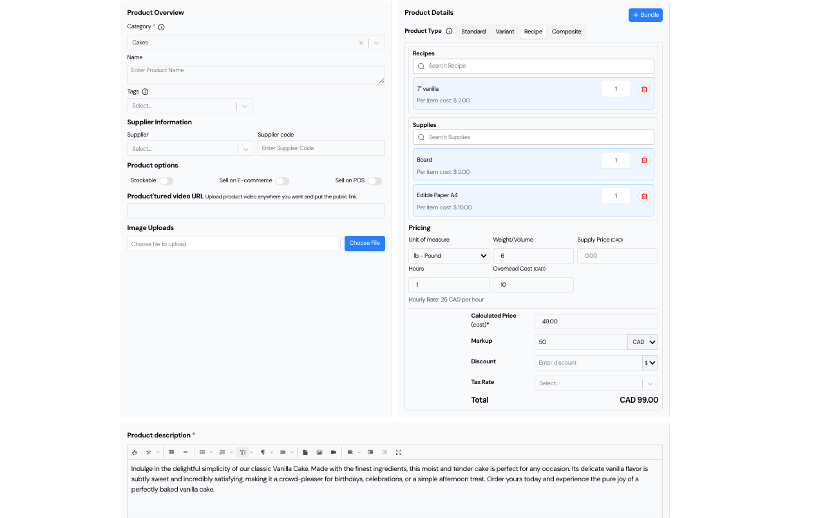
🍰 Recipe Product Setup (Step-by-Step) #
- Select Recipe as Product Type
- Add Recipes (batter, frosting, filling)
- Add Supplies (boards, boxes, prints)
- Define quantity usage
- Add hours and overhead
- Apply markup, tax, and discounts
- System auto-calculates final price
Benefits:
- Accurate cost of goods
- Real-time profitability
- Ingredient & supply tracking
📦 Composite Product Setup (Step-by-Step) #
A Composite Product is a bundle or combination of multiple products sold together as a single item. Each component within the composite product retains its own inventory tracking. The composite has its own SKU and is priced as a unified product.
When to Use Composite Product #
– You want to sell a bundle of multiple products (e.g., cake + cupcakes) as one offering
– You want to track inventory for each item used in the bundle
– You need to calculate the total cost based on the sum of the component product costs
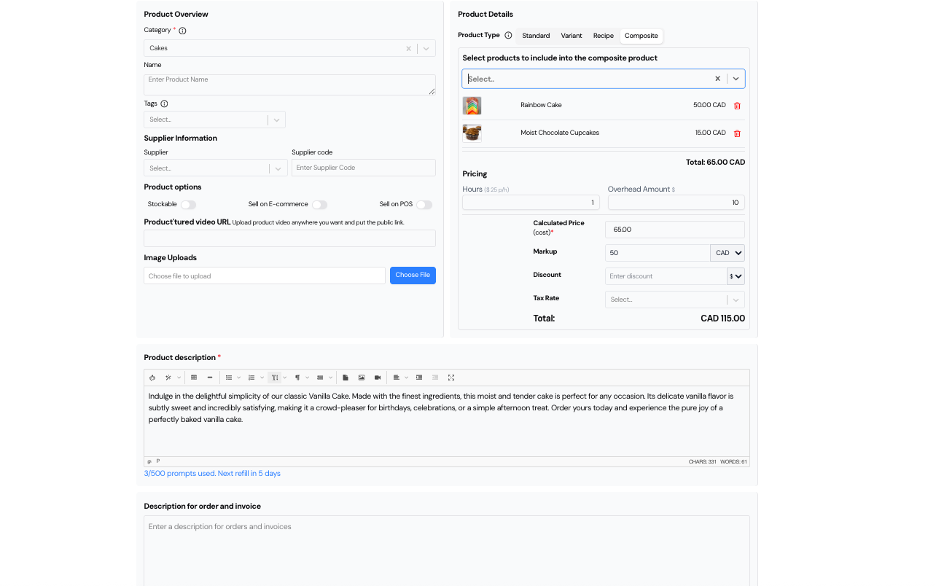
- Select Composite as Product Type
- Add existing products to bundle
- Define overhead and hours
- Apply markup, discount, and tax
- Upload bundle images and description
Benefits:
- Ideal for bundles and offers
- Inventory auto-adjusts per component
- Transparent margin calculation
Example:
– Rainbow Cake = CAD 50.00
– Moist Chocolate Cupcakes = CAD 15.00
– Overhead = CAD 10.00
– Total Cost = CAD 65.00
– Markup 50% → Final Sale Price = CAD 115.00
💡 Tip #
Choose the correct product type before creation.
This ensures accurate inventory tracking, pricing logic, and profitability reporting throughout Bake Boost.
How to manage the Inventory, stocks of Products, Ingredients, and supplies


