
When should a bakery start planning for Christmas? Inside the Bake Boost AI Seasonal Planner
Short answer: start telling customers about Christmas about three weeks before the day and start the baking prep about one week before — for 25 December that is 4 December and 18 December. The AI Seasonal Planner in Bake Boost works those dates out for every occasion in the next six months, looks at your own past orders to say which ones are worth your effort, and drafts the marketing email and the prep checklist for each. It is on the Growth and Pro plans, and on the free trial.
This is post eight in the series on what Bake Boost does for you day to day. Post seven was about allergen labels. This one is about the calendar — the part of the year when a bakery either books out or finds out too late that it could have.
The quick facts
| What it does | Builds a timeline of upcoming occasions, rates each one for your shop, and drafts an email and a prep checklist for each |
| Where you find it | Seasonal Planner in the sidebar (/admin/seasonal-planner) |
| How far ahead it looks | About six months |
| Promote by | 21 days before the occasion |
| Prep by | 7 days before the occasion |
| What the AI reads | Your order counts and revenue by month, your top themes and enquiry event types, and your product names — never customer names or emails |
| What it costs to run | 1 AI credit per Generate or Regenerate. Re-opening a saved plan is free |
| Does it send anything? | No. It only drafts. You review and send |
| Plan | Growth and Pro (and the free trial) |
| Shipped | 21 June 2026 |
Why busy seasons catch bakers out
Every baker knows Christmas is coming. That is not the problem. The problem is that the decisions that make Christmas profitable are due long before it feels like Christmas.
By the time customers start asking in mid-December, the best weekends are already gone to whoever asked first. The ones who asked first did so because somebody told them in late November or early December that orders were open. If that somebody was not you, the order went elsewhere — or it arrives on the 20th, when your oven is full and you can only say no.
The same is true at the other end. A rush you did not plan for means buying boxes, boards and butter at the last minute, at full price, and baking at midnight. A rush you did plan for means a set menu, a cut-off date, and a shopping list that went out a week earlier.
None of that is hard. It is just easy to leave too late, because on 13 November there is always something more urgent than an email about 25 December.
When should a bakery start promoting Christmas orders?
The Seasonal Planner uses two fixed dates for every occasion:
- Promote by — 21 days before. This is when your announcement should go out: the menu, the order cut-off, the collection days.
- Prep by — 7 days before. This is when the production work should start: ingredients bought, packaging in, decoration designs tested, the bake schedule set.
These dates are not guessed by the AI. They come from a fixed rule in the code, applied to the real date of the occasion, so they are the same every time.
Here is what the rule gives for the next few months:
| Occasion | Date | Promote by | Prep by |
|---|---|---|---|
| Christmas | 25 Dec 2026 | 4 Dec 2026 | 18 Dec 2026 |
| New Year | 1 Jan 2027 | 11 Dec 2026 | 25 Dec 2026 |
| Lunar New Year | 6 Feb 2027 | 16 Jan 2027 | 30 Jan 2027 |
| Valentine's Day | 14 Feb 2027 | 24 Jan 2027 | 7 Feb 2027 |
| Mother's Day (UK & Ireland) | 7 Mar 2027 | 14 Feb 2027 | 28 Feb 2027 |
| Easter | 28 Mar 2027 | 7 Mar 2027 | 21 Mar 2027 |
| Mother's Day (US, Canada, most others) | 9 May 2027 | 18 Apr 2027 | 2 May 2027 |
Three weeks is a minimum, not a target. For custom celebration and wedding-style cakes that book weeks ahead, start earlier — and you can always add your own earlier reminder (see Make it yours, below).
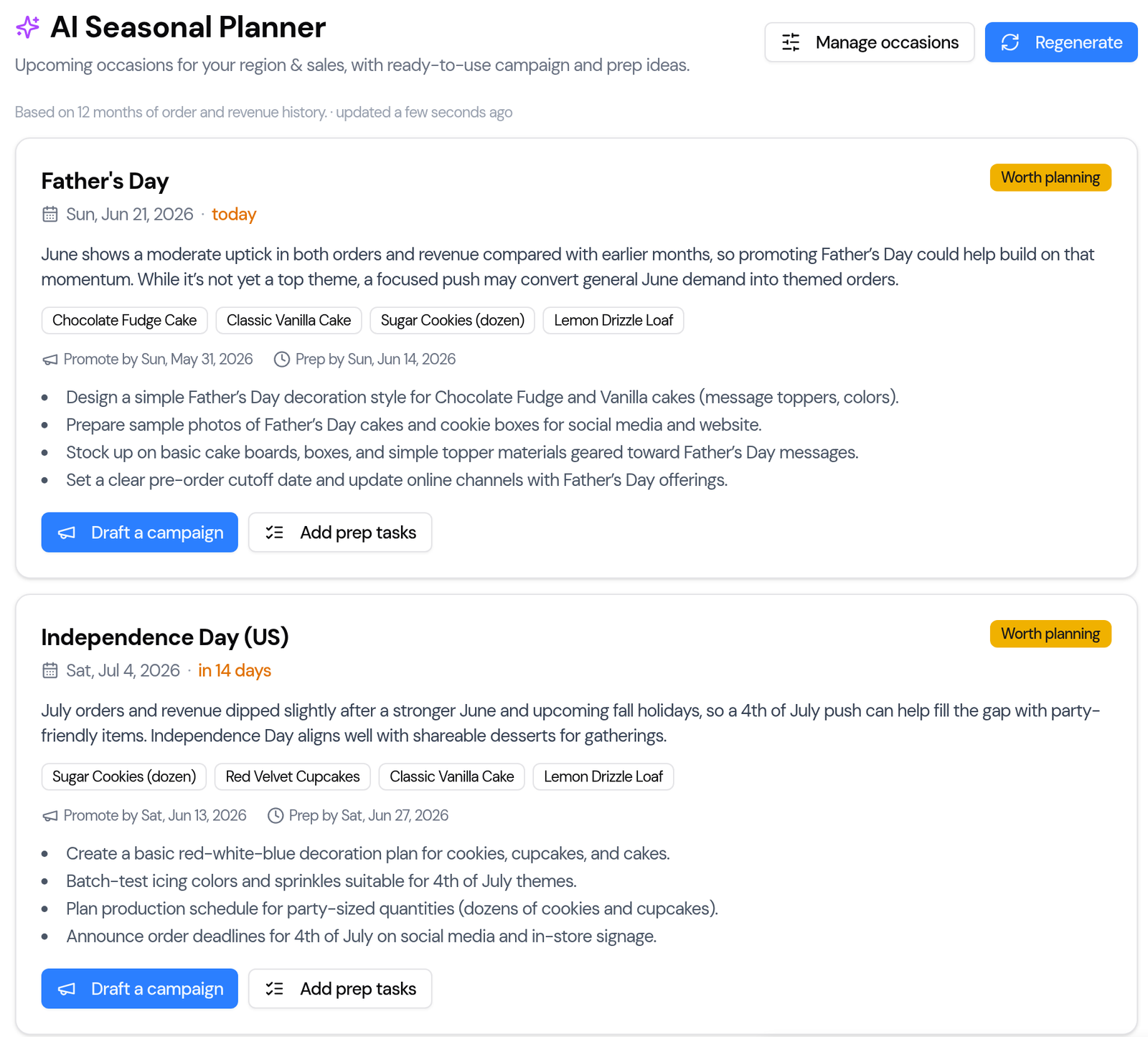
Which occasions does the planner include?
It starts from a calendar for your country, so it is useful on day one, even with no order history:
- Everywhere: New Year, Valentine's Day, Easter, Mother's Day, Father's Day, Halloween and Christmas.
- By country: Thanksgiving (US and Canada, each on its own date), Independence Day (US), Canada Day, Australia Day and UAE National Day.
- Religious and cultural: Ramadan, Eid al-Fitr and Eid al-Adha in Gulf and other predominantly Muslim markets; Diwali in India, the UAE, the UK, Malaysia and Singapore; Lunar New Year in East and South-East Asia, Australia, Canada and the US.
Dates that move — Easter, the Eids, Diwali, Lunar New Year, Mother's and Father's Day — are set to the real date for each year, and per country where they differ. Mothering Sunday in the UK and Ireland, for example, is in March, not May, and Father's Day in Australia and New Zealand is in September.
The AI is only allowed to talk about occasions on that calendar or the ones you add yourself. If it ever names an occasion that is not on the list, Bake Boost drops it before you see the plan.
How does the AI know which occasions matter for my bakery?
This is the part a printed holiday calendar cannot do. Before it writes anything, Bake Boost builds a short summary of your shop from your orders of the last two years, your enquiries and your product list:
- how many orders you had in each month, and the revenue in each month;
- your most common order themes, and the event types on your enquiries;
- your product categories and up to 40 of your product names.
That summary is all the AI gets. No customer names, no email addresses and no individual orders leave your account.
From it, each occasion gets one of three ratings:
- High opportunity — your own history shows a real spike around this time.
- Worth planning — a solid date to prepare for.
- Optional — minor for most bakeries. Keep it, or hide it.
Each card also gives a short reason in plain words — "November is one of your strongest months…" — and two to four recommended products, matched to your own catalogue wherever it can, so the suggestions are things you actually sell.
The page tells you how much history it used ("Based on 12 months of order and revenue history"). If you are new, the ratings lean on the calendar; as your orders build up, they lean on you.
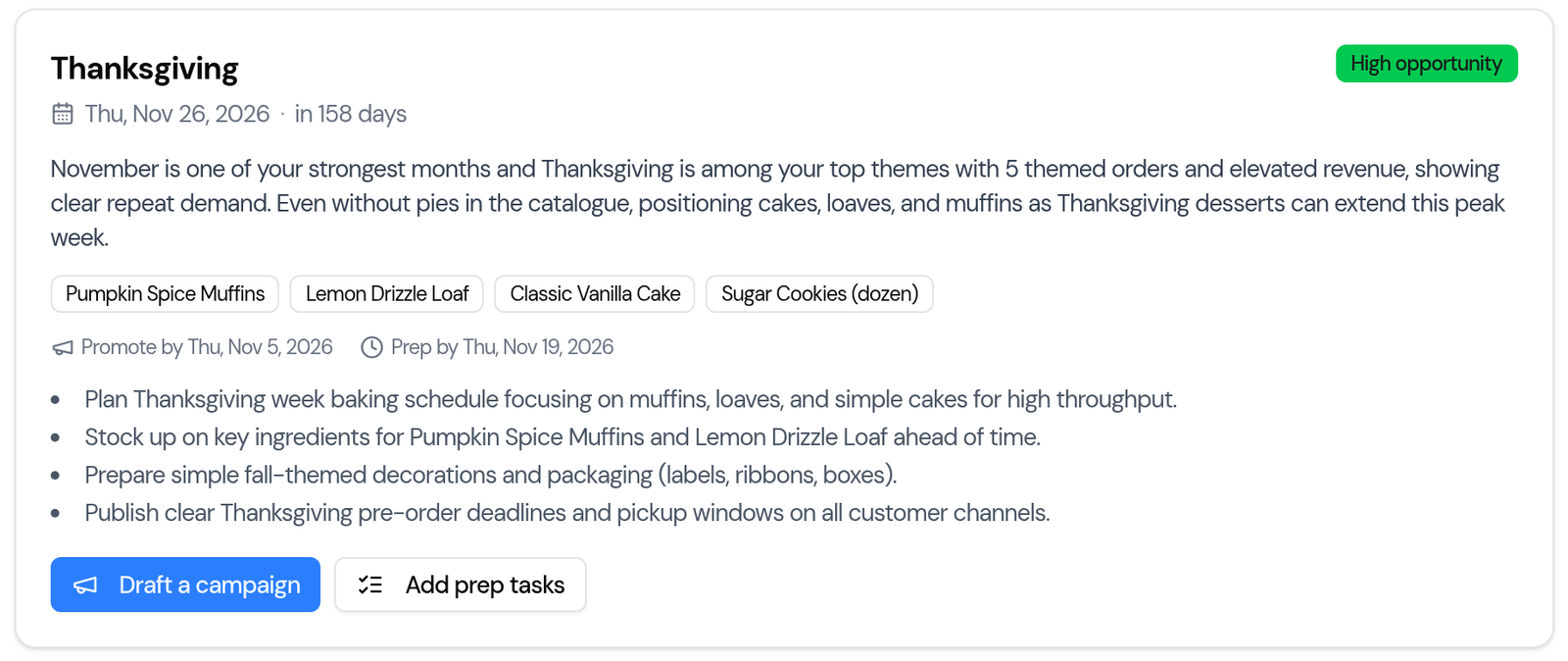
What do "Draft a campaign" and "Add prep tasks" do?
Every card has two buttons, and both save you the blank page.
Draft a campaign creates a ready-to-edit marketing email for that occasion — subject line and body already written — and opens it in the Bake Boost campaign editor. You change what you like, pick who it goes to, and send it when you are ready. The AI is told never to invent prices or promises, but read it anyway: it is your name on the email.
Add prep tasks saves the card's checklist — for example "order festive boxes and ribbon", "test the yule log decoration", "publish the order cut-off" — into your task templates, so you can drop them onto an order's job sheet later.
Nothing is sent or published on its own. The planner drafts; you decide.
Can I add my own dates, like a local market or school fair?
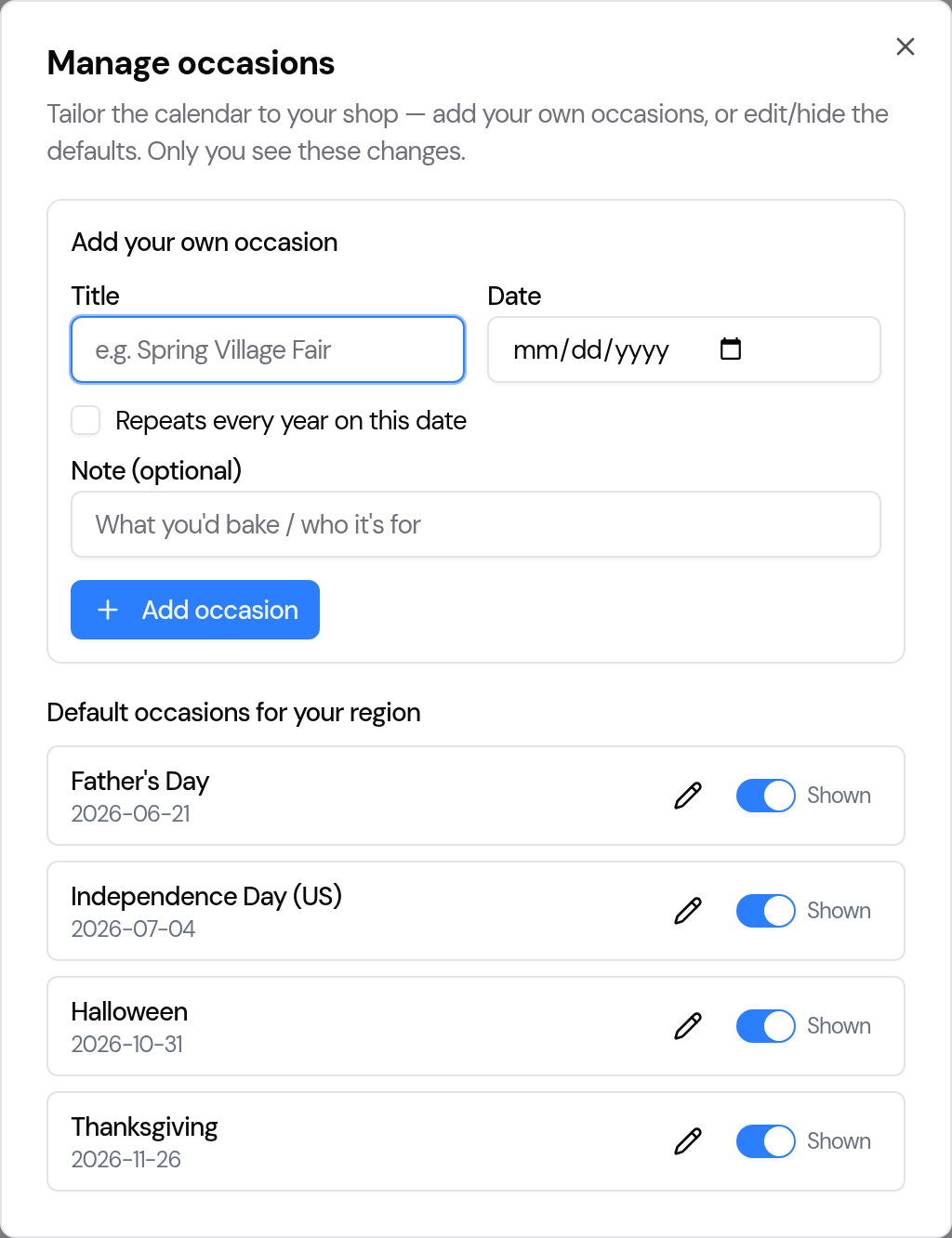
Yes. Click Manage occasions at the top of the page. Changes there are private to your account.
- Add your own occasion — a Christmas market, a school fair, a local festival. Tick Repeats every year on this date for the ones that come round annually, and add a note about what you would bake or who it is for.
- Edit a default — change a date or a name to fit your shop.
- Hide a default — switch off occasions you do not trade on, so they stop cluttering the timeline.
Then click Regenerate to rebuild the plan with your changes.
A ten-minute Christmas setup
- Open Seasonal Planner and click Generate my seasonal plan.
- Click Manage occasions. Add the local dates you trade on — markets, fairs, a late-night shopping evening. Hide the ones you do not.
- Click Regenerate.
- On the Christmas card, click Draft a campaign. Add your menu, your cut-off date and your collection days in your own words. Schedule it for no later than 4 December.
- Click Add prep tasks, and put the tasks on your job sheets for the week of 18 December.
- Do the same for New Year, which follows only a week behind.
- Come back in January and click Regenerate to bring in Valentine's Day and Mother's Day.
What the Seasonal Planner does not do
- It does not send anything. Every email is a draft until you send it.
- It does not set your prices. The AI is told not to invent prices; your menu does that. For pricing itself, see the AI Pricing Advisor and how much to charge for a cake.
- It does not forecast exact quantities. It tells you which dates matter and when to start. To turn confirmed orders into a bake sheet, use the production planner.
- It does not refresh itself. The plan is saved so it opens instantly. As dates pass, click Regenerate.
Frequently asked questions
When should a bakery start promoting Christmas orders?
About three weeks before Christmas Day — by 4 December — with the order cut-off, menu and collection days. For custom cakes that book weeks ahead, announce earlier.
When should a bakery start Christmas prep?
About a week before — by 18 December — buy ingredients and packaging, test decorations and set the bake schedule.
What is the Bake Boost AI Seasonal Planner?
A page that lists the occasions in the next six months for your country and your own dates, rates each one for your shop from your order history, and drafts a marketing email and a prep checklist for each.
How does the Seasonal Planner decide which occasions are a high opportunity?
It reads a summary of your last two years — orders and revenue by month, top themes, enquiry event types and product names. An occasion is rated High opportunity when your own history shows a real spike around that time.
Does the AI see my customers' details?
No. It gets counts, month totals, themes and product names only. No customer names, email addresses or individual orders are sent.
Does the Seasonal Planner send emails automatically?
No. Draft a campaign creates a draft in the campaign editor. You review it, choose the audience and send it yourself.
Can I add my own occasions to the bakery calendar?
Yes. Use Manage occasions to add your own dates, set them to repeat every year, and edit or hide the defaults. The changes are private to your account.
How many AI credits does the Seasonal Planner use?
One AI credit each time you click Generate or Regenerate. Opening a saved plan is free.
Which Bake Boost plan includes the Seasonal Planner?
Growth and Pro, and the 14-day free trial. On Essentials the page invites you to upgrade.
Next in this series
Next: AI Bake Ideas — new product ideas for your menu. If you want the whole picture now, see what you get with Bake Boost, or start a free 14-day trial and generate your own seasonal plan before 4 December.